



Frequently Asked Questions (F.A.Q.)
-

1) What is the role of ADinf32 in providing antivirus protection? Quite often, the term "antivirus program" is used to refer to only one class of antivirus software, antivirus scanners. Scanners can identify thousands of known viruses. Many of modern scanners are equipped with heuristic analyzers that can detect - with certain probability, sometimes relying on indirect evidence - unknown viruses.
There are also other classes of antivirus software. Although simple and intuitive in use, scanners alone cannot secure your system against viral attacks. For more efficient and reliable protection, you will have to integrate different antivirus programs into a single suite. Why? Let's try to understand.
- Firstly, scanners are slow and this is the most obvious disadvantage that prevents their daily use. When scanning a file, a modern scanner has to emulate CPU commands in order to be able to detect polymorphic viruses -- and this is a time-consuming process. Scanning large disks may take several hours. Memory-resident scanners also adversely affect overall system performance.
- Secondly, you have to update scanners regularly. Only the latest version of a scanner -- with its databases that contain the signatures of recently detected viruses -- can provide an adequate protection. If not updated for a mere couple of weeks, a scanner is considered out-of-date.
Antivirus integrity checkers are free from these drawbacks. For instance, ADinf32 can complete disk scan in just a few minutes and doesn't require frequent updates. And it is still able to detect both known and unknown viruses.
However, integrity checkers alone cannot provide an absolute protection either, since they are not designed to check new files. The best approach is to use both a scanner and integrity checker. You'll still have to update the scanner's databases, but this won't be such a critical issue anymore since any unknown viruses will be reliably detected by the integrity checker.
ADinf32 supports interface to antivirus scanner DrWeb. If a file was checked by a scanner and hasn't changed since, there's no point in checking it with the scanner again. So, ADinf32 can create a list of new, changed, renamed, and moved files, i.e. files that do require an antivirus check. Then it can launch a scanner and pass the list to it. This technique can help you considerably reduce overall scan time and organize real daily antivirus checks in your system. ADinf32 became a real user of your scanner.
You will find ADinf32 useful for other purposes, too. It can help you streamline the maintenance of your disks, find files that have been lost accidentally, analyze the results of system failures, check the integrity of your data (say, databases, archives, or documents), etc.You will find ADinf32 useful for other purposes, too. It can help you streamline the maintenance of your disks, find files that have been lost accidentally, analyze the results of system failures, check the integrity of your data (say, databases, archives, or documents), etc.
-
2) Can ADinf32 fail to notice a virus? This is a common question, and there is only one answer to it. Unfortunately, there is no panacea against PC virus infection, nor can there be ever one. ADinf32 seems to be the best virus detector today. But bear in mind its capabilities and limitations. Let us examine the situations where ADinf32 may keep quite.
- First, if you have installed ADinf32 on an already infected machine, it will not notice any virus, because it detects viruses through the changes in file information. And in our case there are no changes in file information and so it does not alert you. If the virus is hiding its presence, i.e., you have a stealth virus in the machine; ADinf32 will certainly detect it, if you run under the STEALTH SEARCH mode. This is a very useful mode and run ADinf32 from time to time under this mode.
- Second, ADinf32 may fail to notice the viruses tailored specifically to infect a file only at the time of creation. If they are additionally hiding themselves, you may trap them, running ADinf32 in STEALTH SEARCH mode. If they are NOT hiding their presence, you can easily detect them with your naked eyes. For example, suppose you are copying a file from drive A to drive C and you notice that the source file has a different size than the target file. You can easily detect such infectors, running ADinf32 as follows: write a batch file (call it TRAP) which copies several executable files, say, to your another drive and then copies them back from the drive to the source drive. Run the TRAP batch file before turning off your computer. When you start the computer next time, ADinf32 will report about such viruses, if any. For greater reliability, you better include files to be copied in STABLE FILES list.
- Third, ADinf32 permits to toggle off many checks. If you, for example, have toggled off check of boot sector of drive C or you have deleted COM or EXE from extension list for control, you may not notice virus-inducted changes.
- Finally, because of its beneficent policy aggressive strategy and ingenious tactics ADinf32 irritates to virus designers. One fine day it is not excepted that you may find a new virus specially tailored to dodge the ADinf32 in your machine. Today there are several viruses which try to delete files with a name begining with "ADIN". What will these evil-mongers do further, God alone knows.
-
3) How to choose CRC type for checking your files? ADinf32 allows you to choose several methods to monitor your files:
- don't check CRC, check file size only;
- check "fast" CRC;
- check CRC16 or CRC32;
- check CRC48. This method combines the file check algorithms used in CRC16 and CRC32;
- check LAN64. This method employs a special 64-bit hash function and is available in ADinf32 Pro only;
- check changes in macros of Microsoft Word documents (.DOC, .DOT files) and Excel spreadsheets (.XLS, .XLT and other files).
"Fast" CRCs are calculated for executable files with a well-known internal structure, such as COM, MZ (MS-DOS), NE (Windows 3.xx), PE (Windows 95/98/NT) and LE (VxD). Thus, fast CRCs are only recommended for files with the following extensions: COM, EXE, DLL, DRV, VXD, and 386. Fast CRCs are calculated over certain portions of a file, which provides a faster (but still reliable) check. Naturally, changes to certain segments of the file (that wouldn't be normally made by a virus) may remain unnoticed.
CRC16, CRC32 and CRC48 provide reliable detection of both virus infection and accidental modification of a file (that, for instance, may result from a disk write error). The longer CRC is, the higher reliability it provides.
LAN64, a specialized hash function, is intended for particularly valuable files whose safety is your top priority. Naturally, this CRC ensures a highly reliable detection of accidental errors. Furthermore, it makes impossible to covertly modify your data. You can read more about LAN64 hash function below in ADinf32 Pro answer.
And the last CRC, "Macro", is specifically intended to detect macro-viruses. If .DOC, .DOT, .XLT and .XLS files are controlled by this CRC, ADinf32 ignores any changes made to the text of a document. However, modification of macros (an infecting technique used by macro-viruses) is immediately detected.
-
4) How to configure the check level? ADinf32 offers substantially enhanced check levels. You can exclude from check not only folders, but individual files too. Check levels can be changed interactively while viewing scan results, with the dynamic update of the results without re-scanning your system.
-
5) Can ADinf32 control network drives? Unfortunately, you can't. ADinf32 checks a drive, reading it sector by sector. Therefore it can check local drives only.
-
6) How to change the interface language in ADinf32? To view languages supported by your ADinf32, click on the window icon in the main window title and open the system menu. If, in addition to English, at least one localization module is installed in your system, the "Language" item will appear in the system menu. Selecting this item opens a list of available languages.
-
7) What is the objective of ADinf32 Pro version? ADinf32 Pro is a special modification for users who demand guaranteed integrity and security of large volumes of valuable information, for example, databases or document archieves. Because of a new LAN64 algorithm used for computing the checksums of files, ADinf32 Pro is not a simple integrity checker, but a powerful utility which keeps strict control over data security.
LAN64 algorithm computes 64-digit checksums with the hash function developed by Russian company LAN Crypto, Ltd. for controlling the security of specially valuable information. It guarantees reliable control over data security and leaves no room for modification of files without changing the value of the hash function.
Under CRC16 and CRC32 algorithms employed in standard ADinf32 versions, the checksums of files can be algorithmically modified so as to introduce slight modifications in files. In this sense, CRC16 and CRC32 checksums are helpless against smart tricks. For both these CRC types, there are algorithms which compute additional bytes so that checksum remains unchanged.
The LAN64 algorithm (hash function) is intelligent enough not to permit anyone to compute the necessary changes without altering the checksum. Trial-and-error method is only way and this cannot be accomplished in real time. Here lies the superiority of LAN 64-digit checksum.
-
8) Is the license on annual basis or lifetime? The license is perpetual for the current and all previous versions of the ADinf32 program. In addition, the license includes a subscription to all ADinf32 updates released during the first year (365 days) after receiving the key. This means that the key works with all versions released before the key was released, and with all versions released within one year (365 days) after the key is issued. If you want to upgrade your version after your subscription year has expired, You can get a 30% discount on the upgrade and with the new key you will get a new one-year subscription period for all versions.
-
9) License is per computer or per user? For individual (private) users, the license is given per user, i.e. private user can use the key on all of its computers.
A corporate license is given per computer and must correspond to the number of computers on which ADinf32 installed. -
10) What does it mean: "Removal of VBR viruses?" Except of files ADinf does several more checks. One of them is checking of MBR and VBRs (Volume Boot Records). ADinf keeps original MBR and boot records (1 sector for FAT, 16 sectors for NTFS partitions) and compares current sectors with kept ones. If MBR or boot record appeared to be changed ADinf allows you to look at changes in special viewer (records and hex views) and restore old one from its diskinfotables. It works not in all cases because some viruses install special interceptors and do not allow to write boot sector back. Because ADinf does not know about particular viruses it cannot remove such interceptors. But not all viruses do it and in many cases MBR or VBR can be easily restored by ADinf to original state.
-
11) What operating systems are supported by ADinf? The next list of operating systems is supported by ADinf32:
- ADinf32 v3.xx:
- Windows 95
- Windows 98
- Windows ME
- Windows NT
- Windows 2000
- ADinf32 v4.xx:
- Windows XP (v4.00-v4.19)
- Windows 2003 (v4.00-v4.19)
- Windows 7 x86 (32-bit system)
- Windows 7 x64 (64-bit system)
- Windows 8.1
- Windows 10
- ADinf32 v5.xx, v6.xx, v7.xx, v8.xx:
- Windows 7 x86 (32-bit system)
- Windows 7 x64 (64-bit system)
- Windows 8.1
- Windows 10
- Windows 11
- ADinf32 v1.xx/Gen2, v2.xx/Gen2:
- Windows 7 x86 (32-bit system)
- Windows 7 x64 (64-bit system)
- Windows 8.1
- Windows 10
- Windows 11
-
12) Does ADinf support 64 bit systems? Does it work in Vista? ADinf32 does support 64-bit version of Windows 7 (Windows 7 x64), Windows 8.1, Windows 10, Windows 11.
Windows Vista is not supported.
-
13) Does the free version of ADinf32 include PRO capabilities so that all I have to do is enter a PRO registration key in order to unlock those PRO capabilities? Correct.
-
14) Does ADinf32 require a restart during installation? No. ADinf32 does not install any drivers and does not modify operating system, so it does not require restart during installation.
-
15) Does ADinf32 need to be installed on an admin account?
And what about UAC?ADinf32 requires Admin privelegies for the low level disk access. In Windows XP it has to be used by admin accounts only. For Windows 7 and later Windows versions it has embedded manifest that initiates UAC system request for Admin privelegies and if the request is confirmed by a user, ADinf32 receives admin rights. BTW, that is why ADinf32 auto-start at boot time dissapeared in Windows 7 and later Windows versions.
-
16) Why can't I get Help from this program? - The Help for this program was created in Windows Help format, which depends on a feature that isn't included in
latest versions of Windows. However, you can download a program that will allow you to view Help created in the Windows
Help format. For more information about Windows 7 and Windows 8.1, go to the Microsoft Help and Support website:
https://support.microsoft.com/kb/917607.
- Patch for Windows 10 & 11 can be downloaded here: or here:
- The Help for this program was created in Windows Help format, which depends on a feature that isn't included in
latest versions of Windows. However, you can download a program that will allow you to view Help created in the Windows
Help format. For more information about Windows 7 and Windows 8.1, go to the Microsoft Help and Support website:
https://support.microsoft.com/kb/917607.
-
17) How can I upgrade ADinf32 version? We do our best to keep backward compatibility between versions. You can install newer version directly over the top of an older one. All settings and diskinfo tables will be preserved.
-
18) Why does not ADinf32 start and complains that some DLLs are absent? You have to download from Microsoft web site and install Update for Universal C Runtime in Windows. Updates are available here. Please select updates for Visual Studio 2015, 2017 and 2019.
More details can be found here.
-
19) Why does ADinf32 in rare cases show error message during installation? You have to download from Microsoft web site and install Update for Universal C Runtime in Windows. Updates are available here. Please select updates for Visual Studio 2015, 2017 and 2019.
More details can be found here.
-
20) Where can I find changes for every ADinf32 release? Please, look here.
-
21 & 22) Why doesn't versions x.xx/Gen2 replace v8.01? Why does ADinf32 keep second diskinfotable copy in root folder for every disk? I have decided to combine these two questions.
Yes, ADinf32 Gen2 does not replace old version (Gen1) but allows it to live in parallel with the new one. The reason is that diskinfotables format was changed and if one uses ADinf32 to monitor removable or flash drives, the old version is needed for some time. All drives have diskinfotable copy in root folder, so if you receive flash disk that was checked with ADinf32 somewhere you can check changes even if you never saw this flash disk earlier.
General logic for flash (and all removable) disks is as follows: If it is your device and flash disk was checked at your computer, its snapshot will be saved both in the root folder and locally on your computer. Please imagine that you gave your flash drive to somebody. That person can check flash drive state based on root diskinfotables. When the drive returns back to you, you can check what has happened with it when it was «travelling». Local diskinfotables are used in that case.
-
23) About a year ago I saw that v8.01 became free, and now the program has become paid again? When capable of running on modern multi-terabyte disks the second generation of the program was conceived the eighth one has become morally and technically obsolete. I considered it incorrect to take money for an obsolete product and it was made available to the public. Now a new product has been released and it is distributed under the same conditions as previouse shareware versions.
As for 8th and other old versions, they are removed from distributions. They were downloaded in large quantities (over the past month, downloaded even dozens of copies of the third version !!!), and then there was an opinion that ADinf32 does not work on large disks, does not support exFAT, etc.
Users who have keys to older versions, if necessary, can get any version that matches the key, upon request via "Contact us" form.
-
24) How does ADinf32 work with removable drives? Flash drives and USB drives? One of the common uses of ADinf32 is monitoring flash drives and other removable drives. There are two scenarios here when ADinf32 may be very useful:- You gave a flash drive to someone and the recipient wants to check the integrity of the information received.
- The flash drive was returned to you and you want to check what changed on it while it was not in your hands.
On removable drives, ADinf32 additionally leaves in the root directory a copy of the disk snapshot and a settings profile exported from the registry on which the snapshot was based.
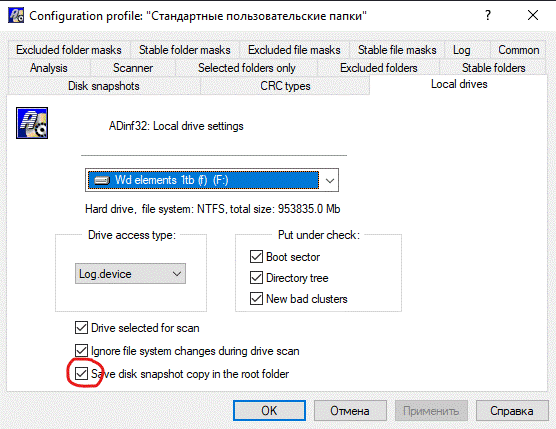
In most cases, ADinf32 correctly detects removable drives and automatically turns on the mode of saving a copy of the snapshot in the root. If this did not happen, then saving a copy of the snapshot in the root of the disk can be enabled in the disk settings, as shown in the picture on the left.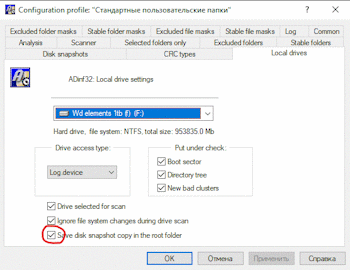


Thus, for removable disks, two copies of disk snapshot are saved - in the usual place on the computer and in the root of the removable disk.What does this give us?
Let's consider the first case when a flash drive is given to someone. The recipient of the flash drive does not have a snapshot of it on his machine and ADinf32 automatically uses a snapshot from the root directory. This will ensure the safety of information on the flash drive or detect changes, for example, that the flash drive was infected with a virus or that one of the files was replaced or damaged by someone before the flash drive reached the recipient.
When you received your flash drive back, the launched ADinf32 will automatically use disk snapshot saved on your computer for this flash drive and you will see what changes have occurred while the flash drive was being passed around.
When checking a flash drive on a new machine, you can use the ADinf32 settings profile, which was used to create a snapshot of the flash drive. To do this, you need to import into the registry a settings profile saved in the root directory of the flash drive as a .reg file. Sufficient for import double click on this file. In ADinf32 you need to select the imported settings profile.
If, after checking the flash drive, the profile is no longer needed, you can delete it from the registry using the settings dialog in ADinf32. -
25) How can I view the last inspection report again? To return to the saved log of the last disk scan, find on your computer Desktop and double-click the icon shown on the left entitled "ADinf32 Gen2 Log". This functionality works starting from ADinf32 v2.08/Gen2.
Please note that the default settings are to log ALL changes, those. The "Hide changes" filters configured in the main interface for viewing changes are not applied. This setting can be changed in the Log configuration individually for each settings profile.